Table of Contents with Scroll Spy
Automatic table of contents built from a page's h1-h3 headings, with a positional scroll spy that bolds the section being read and smooth anchor scrolling.
Table of Contents
Table of Contents
Automatic table of contents generation from page headings with active section highlighting.
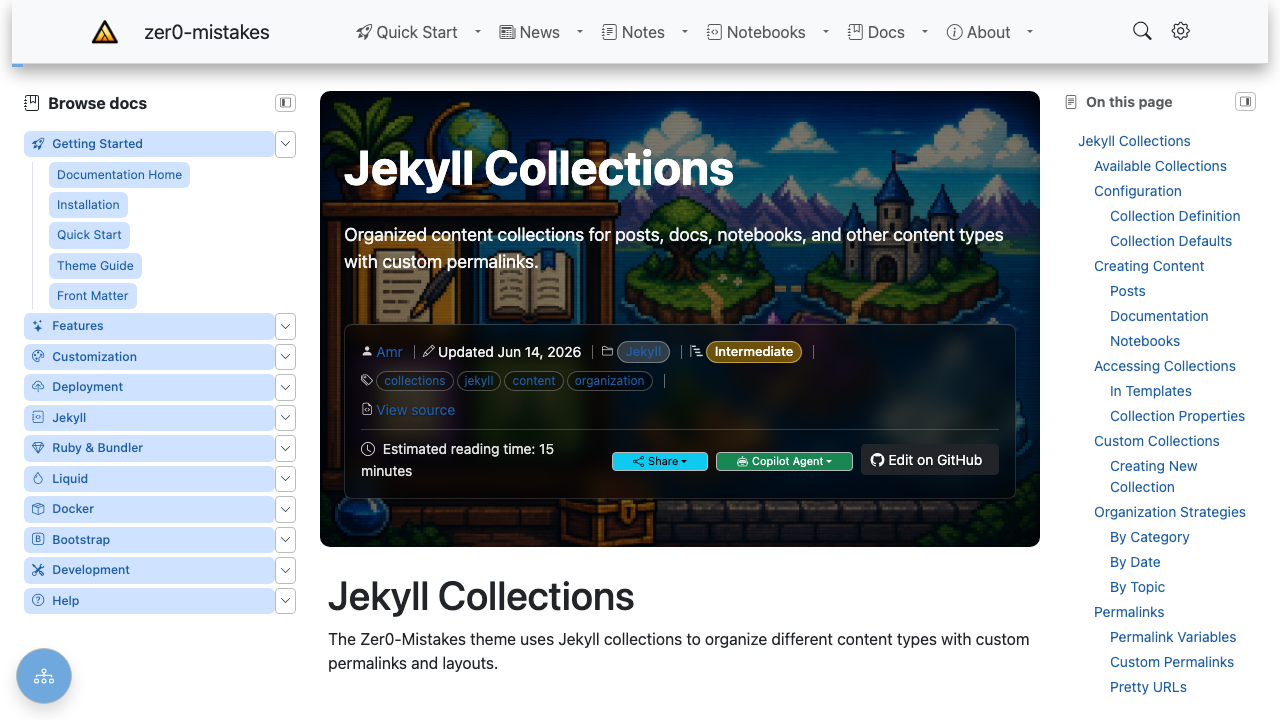
The On this page panel on the right is the table of contents, built from the page’s h1–h3 headings.
Overview
- Auto-Generated: Extracts from h1-h3 headings (the range is a parameter, see Heading Levels)
- Scroll Spy: Highlights current section
- Smooth Scroll: Animated navigation
- Responsive: Sidebar on desktop, offcanvas on mobile
Implementation
Include Template
{% include content/toc.html %}
TOC Generation
The toc.html include uses Kramdown’s built-in TOC:
<nav id="TableOfContents" class="toc">
  <h2 class="toc-title">On This Page</h2>
  {{ content | toc_only }}
</nav>
Or manual extraction:
<nav id="TableOfContents">
  <ul class="toc-list">
    {% for heading in page.content | split: '<h' %}
      {% if heading contains 'id="' %}
        {% assign id = heading | split: 'id="' | last | split: '"' | first %}
        {% assign level = heading | slice: 0, 1 %}
        {% assign text = heading | split: '>' | last | split: '<' | first %}
        <li class="toc-item toc-level-{{ level }}">
          <a href="#{{ id }}" class="toc-link">{{ text }}</a>
        </li>
      {% endif %}
    {% endfor %}
  </ul>
</nav>
Configuration
Enable TOC
In front matter:
---
toc: true
---
Or site-wide in _config.yml:
defaults:
  - scope:
      type: docs
    values:
      toc: true
Heading Levels
The range is set where the TOC is included, with the h_min / h_max parameters. _includes/navigation/sidebar-right.html renders the right-hand panel with h_min=1 h_max=3, so the page title and its h2/h3 sections appear:
{% include content/toc.html html=content h_min=1 h_max=3 %}
The include itself defaults to h_min=1 and h_max=6; anything outside the range is skipped, as is any heading without an id.
Styling
Basic Styles
.toc {
  position: sticky;
  top: 80px;
  max-height: calc(100vh - 100px);
  overflow-y: auto;
}

.toc-title {
  font-size: 0.875rem;
  font-weight: 600;
  text-transform: uppercase;
  letter-spacing: 0.05em;
  margin-bottom: 1rem;
}

.toc-list {
  list-style: none;
  padding: 0;
  margin: 0;
}

.toc-link {
  display: block;
  padding: 0.25rem 0;
  color: var(--bs-secondary);
  text-decoration: none;
  font-size: 0.875rem;
  border-left: 2px solid transparent;
  padding-left: 0.75rem;
}

.toc-link:hover {
  color: var(--bs-primary);
}

.toc-link.active {
  color: var(--bs-primary);
  border-left-color: var(--bs-primary);
  font-weight: 500;
}
Nested Levels
.toc-level-3 {
  padding-left: 1rem;
}

.toc-level-4 {
  padding-left: 2rem;
  font-size: 0.8125rem;
}
Scroll Spy
assets/js/modules/navigation/scroll-spy.js bolds the entry for the section you are reading. The rule is positional rather than visibility-based: the active heading is the last one whose top has crossed the reading line — a line scroll-padding-top below the top of the viewport, i.e. just under the fixed header, which is also where clicking a TOC entry parks its heading. Once the page is scrolled to the bottom, the last heading wins, so trailing sections shorter than the viewport are still reachable.
// Simplified: the active heading, recomputed on each scroll frame.
function activeHeading(headings) {          // headings sorted by document offset
  const pad = parseFloat(getComputedStyle(document.documentElement).scrollPaddingTop);
  const atBottom =
    window.innerHeight + window.scrollY >= document.documentElement.scrollHeight - 4;
  if (atBottom) return headings[headings.length - 1];

  const line = window.scrollY + pad + 4;
  let active = headings[0];
  for (const heading of headings) {
    if (heading.top > line) break;
    active = heading;
  }
  return active;
}
Heading offsets are measured once and re-measured on resize or content reflow (ResizeObserver), and the recompute is throttled to one animation frame per scroll, so the whole page is re-evaluated on every frame without measuring the DOM each time.
Asking IntersectionObserver for the “most visible” heading looks simpler but does not work: headings are only a few pixels tall, so every heading inside the observer band reports the same intersectionRatio, and headings leaving the band trigger no callback at all. The highlight then lands on whichever heading happened to be in the last callback batch.
Two details matter for feel. A clicked entry stays active while the smooth scroll animates, instead of flashing every heading passed on the way. And keeping the active entry visible inside a long TOC adjusts the TOC container’s own scrollTop — scrollIntoView() would bubble up and scroll the page, which feeds straight back into the spy.
Configuration (assets/js/modules/navigation/config.js):
| Key | Default | Purpose |
|---|---|---|
scrollSpy.offset |
null |
Reading-line distance from the viewport top. null derives it from scroll-padding-top; set a number to pin it. |
scrollSpy.tolerance |
4 |
Slack (px) at the reading line and when detecting the bottom of the page. |
Smooth Scrolling
CSS Method
html {
  scroll-behavior: smooth;
}
JavaScript Method
document.querySelectorAll('.toc-link').forEach((link) => {
  link.addEventListener('click', (e) => {
    e.preventDefault();
    const targetId = link.getAttribute('href').slice(1);
    const target = document.getElementById(targetId);
    const headerOffset = 80;
    const position = target.offsetTop - headerOffset;

    window.scrollTo({
      top: position,
      behavior: 'smooth'
    });

    history.pushState(null, '', `#${targetId}`);
  });
});
Responsive Behavior
Desktop
TOC appears in right sidebar:
<aside class="d-none d-lg-block">
  {% include content/toc.html %}
</aside>
Mobile
TOC in offcanvas (see Mobile TOC):
<div class="offcanvas offcanvas-end d-lg-none" id="tocSidebar">
  {% include content/toc.html %}
</div>
Accessibility
ARIA Attributes
<nav id="TableOfContents"
     aria-label="Table of contents"
     role="navigation">
Keyboard Navigation
- Tab through TOC links
- Enter to navigate to section
- Focus moves to heading
Troubleshooting
TOC Not Generating
- Verify headings have IDs
- Check
toc: truein front matter - Ensure Kramdown processor
Scroll Spy Not Working
- Check heading IDs match TOC hrefs — the spy resolves each TOC link’s
hrefto a heading byid, so a link with no matching element is skipped - Check the reading line —
scroll-padding-toponhtml(orconfig.scrollSpy.offset) decides when a heading becomes current - Check nothing else claims
#TableOfContents— a second scroll spy (adata-bs-spy="scroll"element targeting it) fights over the.activeclass
Styling Issues
- Check sticky positioning
- Verify z-index
- Test overflow behavior
Related
See also
- [[Features]]
- [[Mobile TOC Floating Action Button]]
- [[Sidebar Navigation System]]