Giscus Comments
Integrate GitHub Discussions-powered comments into your Jekyll site using Giscus - a modern, privacy-friendly alternative to Disqus.
Table of Contents
Giscus Comments
Add a GitHub Discussions-powered comment system to your Jekyll site with automatic theme detection and privacy-friendly design.
Overview
Giscus is a comments system powered by GitHub Discussions. Unlike traditional services like Disqus, Giscus:
- Requires no database — comments are stored in GitHub Discussions
- Respects privacy — no tracking, no ads
- Supports reactions — GitHub emoji reactions on comments
- Auto theme detection — matches your site’s light/dark mode
- Free and open source — MIT licensed
Prerequisites
Before setting up Giscus, ensure you have:
- A public GitHub repository for your Jekyll site
- GitHub Discussions enabled on the repository
- The Giscus app installed on your repository
Installation
Step 1: Enable GitHub Discussions
- Go to your repository on GitHub
- Navigate to Settings → General
- Scroll to Features section
- Check Discussions
Step 2: Install Giscus App
This is the step most likely to be silently skipped — nothing in your repository can declare it, and no test or build can detect that it’s missing. Without it the widget renders an error instead of a comment box, no matter how correct _config.yml is.
- Visit https://github.com/apps/giscus
- Click Install (or Configure, if you’ve installed it on another account before)
- Select the account that owns the repository
- Grant access — either All repositories or Only select repositories including this one
-
Verify it took effect:
./scripts/bin/giscus-discussions doctor
Forking this theme? A fork does not inherit the upstream repo’s app installation, and the
data-repo-id/data-category-idin_config.ymlstill point atbamr87/zer0-mistakes. You must install the app on your own repo and regenerate both IDs.
Step 3: Get Configuration Values
- Visit https://giscus.app/
- Enter your repository name (e.g.,
username/repo-name) - Select your preferred settings:
- Page ↔ Discussions Mapping:
pathname(recommended) - Discussion Category: Choose or create a category like “Comments”
- Features: Enable reactions, lazy loading as desired
- Page ↔ Discussions Mapping:
- Copy the
data-repo-idanddata-category-idvalues
Step 4: Configure Jekyll
Add the Giscus configuration to your _config.yml. The theme reads exactly three keys — enabled, data-repo-id, and data-category-id:
# Giscus Comment System Configuration
giscus:
  enabled: true
  data-repo-id: "YOUR_REPO_ID"
  data-category-id: "YOUR_CATEGORY_ID"
The data-repo value is filled in automatically from site.repository (set near the top of _config.yml), so you don’t repeat the owner/repo here.
Verify it works
The comment section renders at the bottom of the article, note, and notebook layouts, gated consistently on page.comments != false and site.giscus.enabled. Keeping enabled: true in the config block renders comments on all three layouts.
Blog posts (pages/_posts/, the article layout) and notes/notebooks show comments by default; docs and general pages do not. Override per page with comments: false (or comments: true) in a page’s front matter.
-
Build the site with the dev config:
docker-compose exec -T jekyll bundle exec jekyll build \ --config '_config.yml,_config_dev.yml' -
Confirm the Giscus script is emitted on a built post and your IDs were interpolated (no empty attributes):
grep -A1 'giscus.app/client.js' _site/**/index.html | grep -m1 data-repo-idExpected: a
data-repo-id="..."attribute carrying your real ID. An emptydata-repo-id=""means thegiscusblock is missing or the key is misspelled. -
Serve the site (
docker-compose up) and open a post. The widget does load onlocalhost— Giscus keys off thedata-repoattribute, not the page’s origin, so the iframe renders and reports real errors locally. This makes localhost a genuine end-to-end check, not just a “is the tag there?” check.What you should see, and what each state means:
A working widget looks like this — reaction bar, comment count, a Write/Preview box and a Sign in with GitHub button:
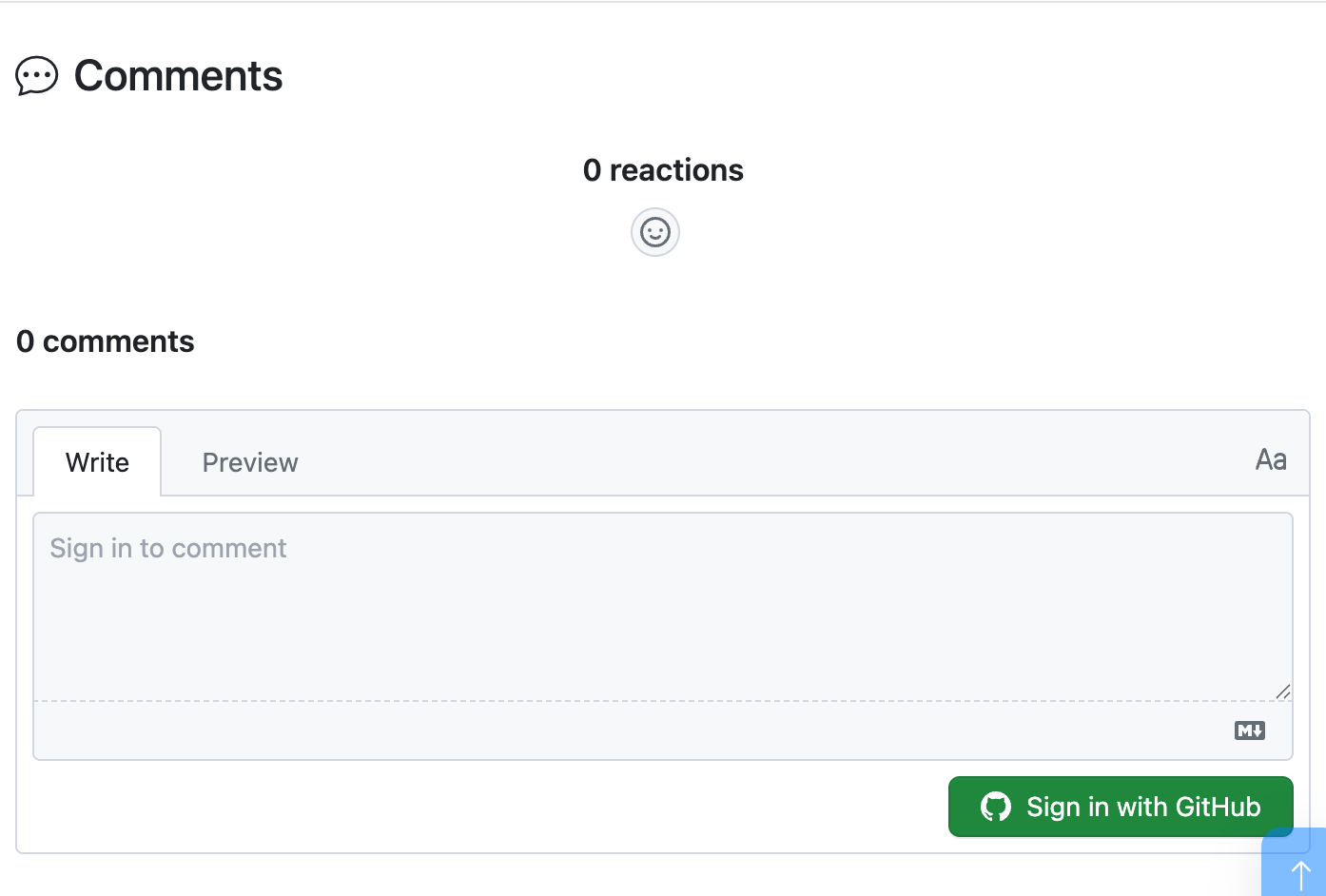
What renders under the “Comments” heading Meaning The comment box and any existing thread (above) Fully working An error occurred: giscus is not installed on this repositoryThe giscus app is not installed — see Troubleshooting An error occurred: Discussion not foundNormal for a page nobody has commented on yet; Giscus creates the discussion on the first comment Nothing at all enabled: false,comments: falseon the page, or the include isn’t reachedYou will not be able to sign in and post from
localhost(GitHub’s OAuth redirect is bound to the deployed origin), but everything up to that point is faithful. -
Confirm the full chain — repo public, Discussions on, app installed, category valid — with one request, no browser needed:
# Replace the repo and category with your own
curl -s -G https://giscus.app/api/discussions \
  --data-urlencode "repo=bamr87/zer0-mistakes" \
  --data-urlencode "category=Announcements" \
  --data-urlencode "term=/" \
  -d "number=0&strict=true&first=1" | head -c 200
A JSON payload with a
discussionkey means the chain is healthy.{"error":"giscus is not installed on this repository"}means the app is missing — the config can be perfect and comments will still be broken.
Configuration Options
Data attributes
The theme’s include lives at _includes/content/giscus.html. Only the first three attributes below are wired to your _config.yml; the rest are fixed in the include. To change a fixed attribute you must edit _includes/content/giscus.html directly.
| Attribute | Source | Value |
|---|---|---|
data-repo |
Config | {{ site.repository }} |
data-repo-id |
Config | {{ site.giscus.data-repo-id }} (required) |
data-category-id |
Config | {{ site.giscus.data-category-id }} (required) |
data-mapping |
Fixed in include | pathname |
data-strict |
Fixed in include | 1 |
data-reactions-enabled |
Fixed in include | 1 |
data-emit-metadata |
Fixed in include | 0 |
data-input-position |
Fixed in include | top |
data-theme |
Fixed in include | preferred_color_scheme |
data-lang |
Fixed in include | en |
Theme options
The include ships with data-theme="preferred_color_scheme" (auto light/dark). To use a different theme, edit data-theme in _includes/content/giscus.html to one of:
| Value | Description |
|---|---|
preferred_color_scheme |
Auto-detect from browser settings (default) |
light |
Always light mode |
dark |
Always dark mode |
dark_dimmed |
Dimmed dark mode |
transparent_dark |
Transparent dark background |
| Custom URL | Load custom CSS theme |
Disabling comments per page
To disable comments on specific pages, add to front matter:
---
title: "Page Without Comments"
comments: false
---
Building conversations with Claude Code
Because comments are GitHub Discussions, you can read, draft, and reply to them from the terminal — and Claude Code can drive the whole flow. Two pieces ship with the theme:
scripts/bin/giscus-discussions— agh-powered engine with subcommandsdoctor,categories,list,thread,draft,seed, andpost.- The
giscus-conversationskill (.github/skills/giscus-conversation/) — tells Claude Code how to read a page’s thread, draft a maintainer reply with the reader’s context in mind, and publish it.
# Is the whole chain healthy? (app installed, IDs match, category valid)
./scripts/bin/giscus-discussions doctor

# What categories exist (and their node IDs for _config.yml)?
./scripts/bin/giscus-discussions categories

# Which pages have comment threads?
./scripts/bin/giscus-discussions list

# Read the full conversation for a page
./scripts/bin/giscus-discussions thread --page /posts/2025/01/21/remote-work-revolution/

# Draft a reply scaffold (thread context + a REPLY section to fill in)
./scripts/bin/giscus-discussions draft --number 7 --out reply.md

# Preview, then post (writes go to public Discussions — always --dry-run first)
./scripts/bin/giscus-discussions post --number 7 --body-file reply.md --reply-to DC_xxx --dry-run
The script reads the repository from gh repo view and the category from _config.yml; override with --repo / --category-id (or the GISCUS_REPO / GISCUS_CATEGORY_ID env vars) when working against a fork. Writes (seed, post) are no-ops under --dry-run. A read-only giscus-digest.yml workflow surfaces new comment activity in the Actions job summary.
How a page maps to a discussion
With data-mapping="pathname" and data-strict="1" (both fixed in the include), Giscus finds a page’s thread by matching the discussion title against the page’s pathname — with the leading slash removed.
For https://zer0-mistakes.com/posts/2025/01/21/remote-work-revolution/ the widget requests:
term=posts/2025/01/21/remote-work-revolution/
So the discussion backing that page must be titled exactly:
posts/2025/01/21/remote-work-revolution/
not /posts/2025/01/21/remote-work-revolution/. This matters in exactly two situations:
- You seed a thread by hand. A leading slash produces a discussion Giscus
will never find — the page keeps showing an empty widget while the discussion sits in the category looking correct.
giscus-discussions seed --page /any/form/normalizes this for you; passing--titleyourself does not. - You migrate or rename discussions. Retitle to the no-leading-slash form or the mapping breaks silently.
In the normal case you never think about this: Giscus creates the discussion itself, correctly titled, the first time a visitor comments.
Migration from Disqus
If migrating from Disqus:
- Export Disqus comments (optional — for archival)
- Remove Disqus scripts from your templates
- Delete Disqus configuration from
_config.yml - Follow the installation steps above
- Note: Existing Disqus comments won’t transfer to Giscus
Troubleshooting
The giscus app is not installed
The single most common way a correctly configured site still shows no comments. Every value in _config.yml can be right — repo public, Discussions on, valid IDs — and the widget will still render only this:
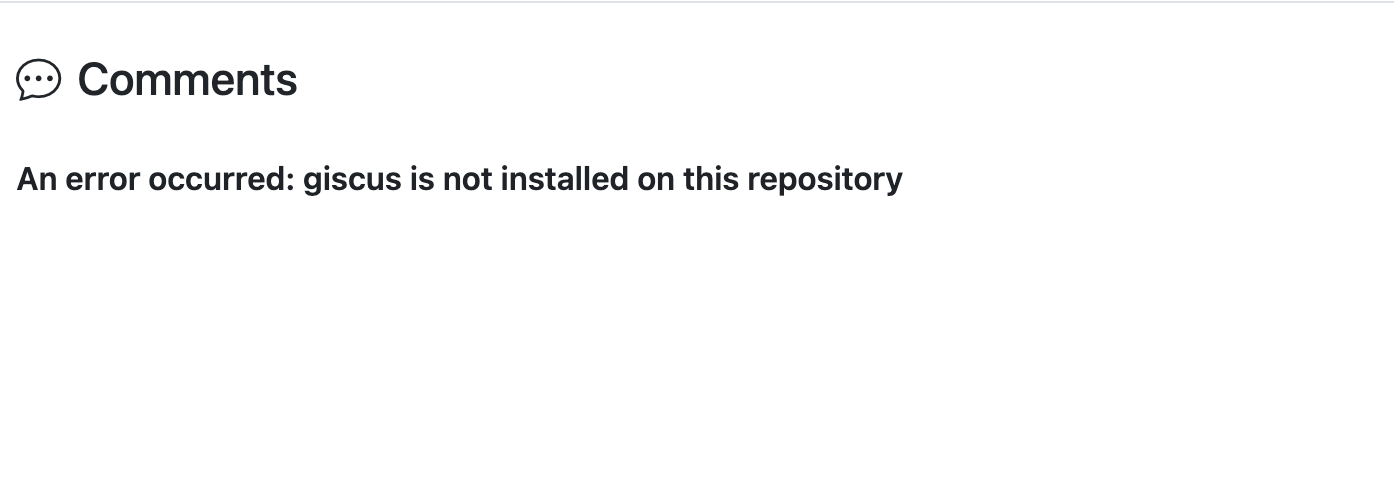
The giscus.app configurator reports the same thing when you type the repository in — it checks all three prerequisites at once:
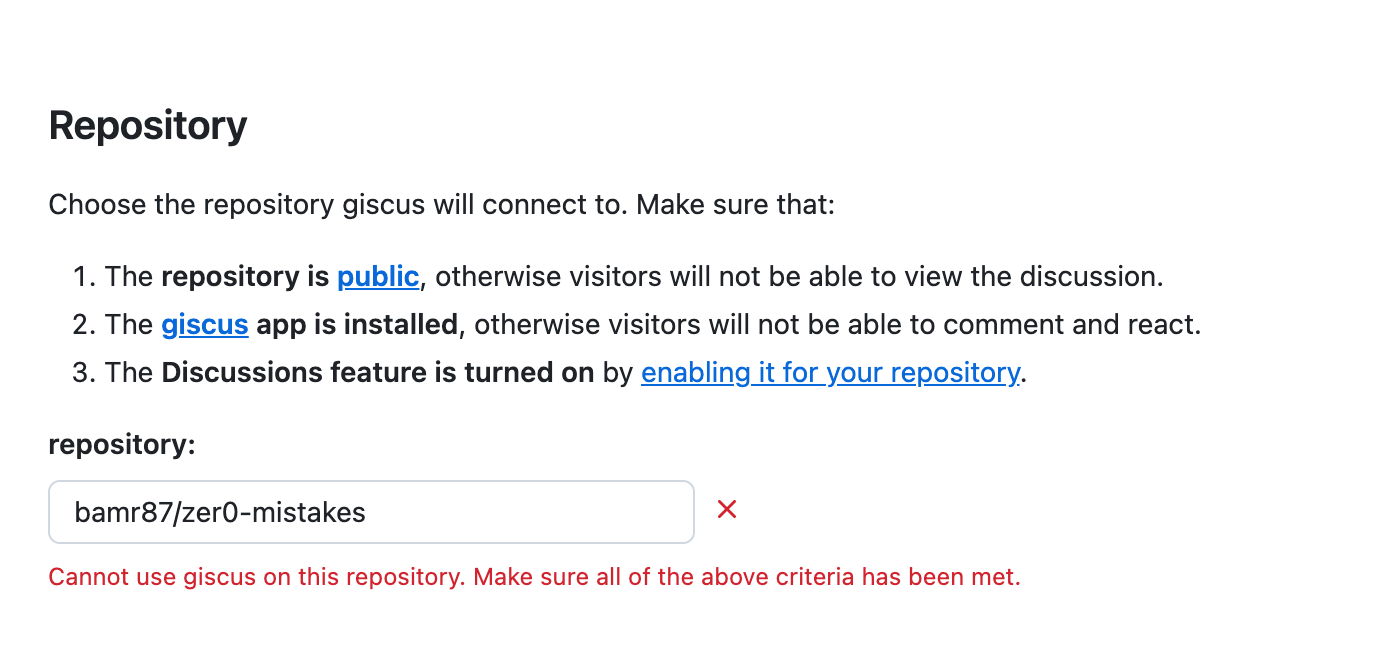
Why it happens: installing the app is a one-time action on the repository, not something any file in the repo can declare. Nothing in _config.yml, no test, and no Jekyll build can perform or detect it — so it is easy to complete every documented “configuration” step and still be missing the prerequisite. Forks are especially exposed: a fork inherits the config but not the upstream repo’s app installation.
Fix: install the app at github.com/apps/giscus → Configure → select the account → grant access to the repository (either “All repositories” or “Only select repositories” including this one).
Verify without opening a browser — this is the check worth putting in your setup notes:
curl -s -G https://giscus.app/api/discussions \
  --data-urlencode "repo=OWNER/REPO" \
  --data-urlencode "category=Announcements" \
  --data-urlencode "term=/" \
  -d "number=0&strict=true&first=1" | head -c 200
{"error":"giscus is not installed on this repository"} → still missing. Any JSON with a discussion key → installed and working.
Comments Not Appearing
- Check repository visibility — must be public
- Verify Discussions are enabled on the repository
- Confirm Giscus app is installed on the repository
- Validate configuration IDs match your repository —
data-repo-idmust belong to this repo (a forked-in ID from the upstream repo will make the widget show a “repository does not match” error even though the script tag renders). Regenerate at giscus.app, or list valid category IDs with./scripts/bin/giscus-discussions categories. - Check the config key spelling — it must be
giscus:(notgisgus:); the layouts readsite.giscus.enabled. TheGiscus Comments Configurationcore test guards this.
Theme Not Matching
The include uses data-theme="preferred_color_scheme", which follows the browser’s light/dark preference. To force a theme, edit data-theme in _includes/content/giscus.html:
<!-- Force a specific theme -->
data-theme="light"

<!-- Or load a custom CSS theme -->
data-theme="https://yoursite.com/giscus-custom.css"
Multiple Comment Threads
If pages are creating duplicate discussions:
- The include already ships with
data-strict="1"anddata-mapping="pathname"— confirm you haven’t changed them in_includes/content/giscus.html - Verify page URLs are stable (no trailing-slash issues), since
pathnamemapping keys discussions to the URL path
Best Practices
- Pathname mapping and strict mode are on by default — the include already sets
data-mapping="pathname"anddata-strict="1", which is the most reliable setup for Jekyll sites - Create a dedicated category — keeps comments organized
- Test locally — the embedded thread won’t load on localhost, but verify the
https://giscus.app/client.jsscript tag is present - Disable per page when needed — set
comments: falsein a page’s front matter (works in thearticle,note, andnotebooklayouts)
Further Reading
This guide is part of the Zer0-Mistakes Jekyll Theme documentation.
See also
- [[Features]]
- [[PostHog Analytics]]