Admin Layout & Configuration Dashboards
Admin-style layout and dashboard partials for surfacing site configuration, build info, and feature flags in a single place.
Table of Contents
Admin Layout & Configuration Dashboards
The zer0-mistakes theme ships an admin layout and a set of dashboard partials for surfacing site configuration, build metadata, and feature flags — all in one place, without requiring a CMS or backend.
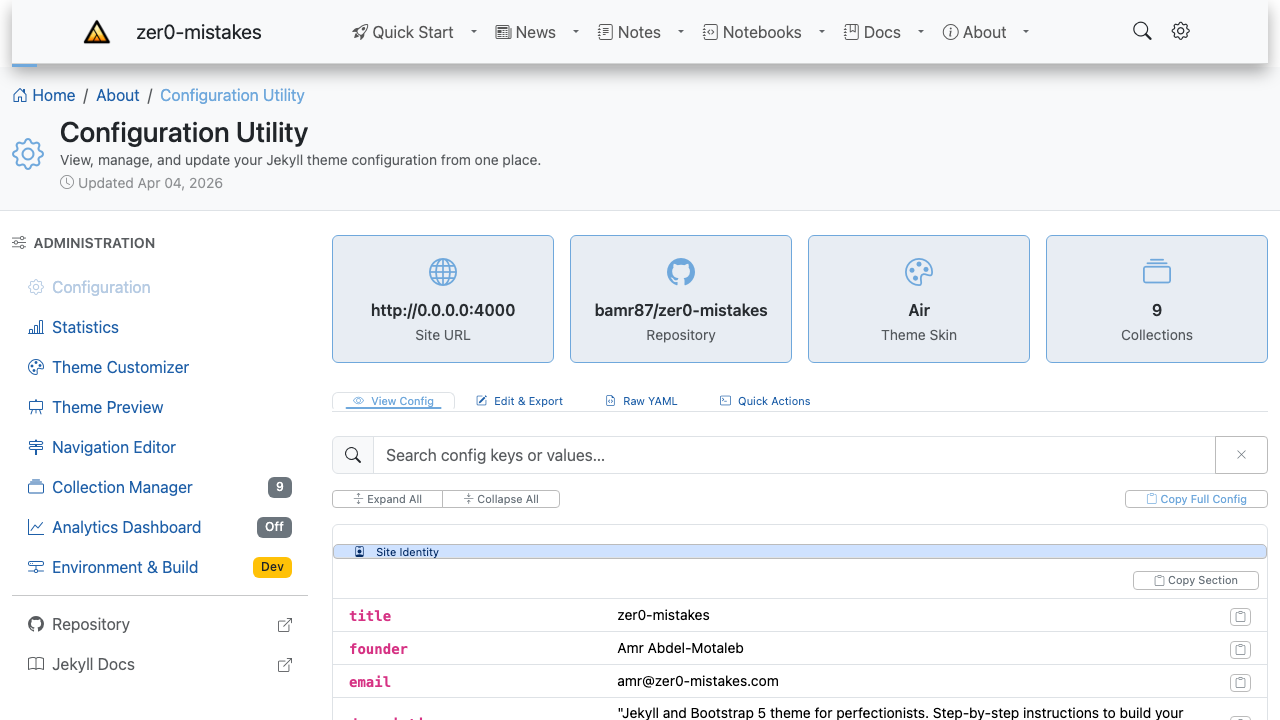
The built-in admin pages live under /about/ — Configuration (/about/config/), Statistics, Theme Customizer, Theme Preview, Navigation Editor, Collection Manager, Analytics Dashboard, and Environment & Build. They read straight from _config.yml and Jekyll’s site data, so there’s nothing to wire up.
Admin Layout
Any page can use the admin layout by setting layout: admin in its frontmatter:
---
layout: admin
title: Site Configuration
icon: bi-gear
---
Supported Frontmatter
| Field | Type | Description |
|---|---|---|
icon |
string | Bootstrap Icons class shown in the page header (e.g. bi-gear) |
admin_nav |
boolean | Show the admin sidebar (default: true) |
admin_section |
string | Active section key for sidebar highlighting |
admin_actions |
array | Header actions (label, url, icon, style): the first is a button, the rest open from “More actions” |
Header Actions
admin_actions stays usable at every screen width. The first entry renders as a button (its style applies, default btn-outline-secondary); any further entries become items of a More actions (⋯) dropdown next to it, where style is ignored. On narrow screens the actions wrap onto their own line under the page title:
admin_actions:
  - label: Theme Customizer
    url: /about/settings/theme/
    icon: bi-palette
    style: btn-outline-primary
  - label: Component Showcase
    url: /about/settings/components/
    icon: bi-grid-3x3-gap
Layout Structure
Admin page
├── Admin header  (breadcrumbs + icon + title + actions)
├── Admin sidebar (collapsible; collapses to offcanvas on mobile)
└── Main content  (page body, tab panels, data tables, …)
Admin Navigation
A dedicated sidebar navigation partial is included automatically with the admin layout:
_includes/navigation/admin-nav.html
It renders a vertical nav with links to all admin/settings pages, read from _data/navigation/admin.yml. Each item’s group: key places it under a small-caps section label — Configure, System and Links in the theme’s own file — and sections appear in the order they first occur in the file. Items without a group: are listed together without a label, so a navigation file written before groups existed keeps working:
- title: Configuration
  url: /about/config/
  icon: bi-gear
  group: Configure
  description: View and export site configuration
The current page is marked with aria-current and a light tint of the active skin’s colour. Counts show as plain numbers and statuses as a coloured dot with a word (for example Analytics “Off”, Environment “Dev”).
Tabbed Admin Pages
Use the admin-tabs component to split a single admin page into tabs:
{% include components/admin-tabs.html
   id="config"
   tabs="view:View Config:bi-eye:true|edit:Edit & Export:bi-pencil-square:false|raw:Raw YAML:bi-file-earmark-code:false"
%}
<div class="tab-content pt-4" id="configTabContent">
  <div class="tab-pane fade show active" id="pane-view" role="tabpanel">
    <!-- your content -->
  </div>
</div>
Each tab definition is id:label:icon:active, pipe-separated.
Built-In Admin Pages
The theme ships several admin pages under pages/_about/settings/:
| Page | Permalink | Purpose |
|---|---|---|
config.md |
/about/settings/config/ |
View and export _config.yml |
theme.md |
/about/settings/theme/ |
Theme colours and Bootstrap overrides |
navigation.md |
/about/settings/navigation/ |
Edit navigation data |
analytics.md |
/about/settings/analytics/ |
Analytics provider settings |
collections.md |
/about/settings/collections/ |
Collection configuration |
environment.md |
/about/settings/environment/ |
Build environment info |
Creating a Custom Admin Page
---
layout: admin
title: My Dashboard
description: Custom dashboard for my site
preview: /images/previews/admin-layout-configuration-dashboards.png
icon: bi-speedometer2
permalink: /admin/my-dashboard/
sidebar:
  nav: docs
---

# My Dashboard

Add your content here. Use Bootstrap 5 components freely.
Related
See also
- [[Features]]
- [[Customization]]