Author Profiles and About-the-Author Bylines
Define author profiles and surface bylines, bio cards, and per-author profile pages across every collection in the Zer0-Mistakes Jekyll theme.
Table of Contents
The theme ships a single, layered author system so every collection — posts, docs, notes, notebooks, quickstart, about, and any you add — presents authors consistently: a linked byline with an avatar, an “About the Author” bio card, and an interactive per-author profile page that aggregates everything they’ve written, with filter / search / sort controls.
Want to contribute? The Guest author page is a hands-on guide to writing your first article and earning your own author profile — the workflow, front matter, and review process in one place.
1. Define authors in _data/authors.yml
_data/authors.yml is the single source of truth. Each top-level key is an author key you reference from front matter.
bamr87:
  name: "Amr Abdel-Motaleb"        # required — display name
  bio: "Creator of zer0-mistakes…" # shown in the bio card + profile hero
  avatar: "/images/authors/bamr87.png"  # asset path, OR a full URL (e.g. a
                                        # GitHub avatar). Omit it and the author's
                                        # github handle resolves the avatar instead.
  role: "Creator & Lead Developer"
  github: "bamr87"
  twitter: "bamr87"
  linkedin: "bamr87"
  website: "https://zer0-mistakes.com"
  expertise:                       # optional — rendered as chips
    - "Jekyll theme development"
    - "Docker containerization"
  # profile: false                 # optional — opt out of a generated profile page
A default entry is used as the fallback for any unknown author. See the file header for the full field list.
2. Reference an author from content
Set author in a page’s front matter to an author key:
---
title: My Post
author: bamr87
---
When the value matches a key, the theme renders the avatar, resolves the display name, links the byline to the profile page, and shows the “About the Author” card. If the value is a plain string that is not a key (e.g. author: "Jane Doe"), it is shown as-is with no avatar or profile link — so existing content keeps working.
3. What renders where
| Surface | Component | Appears in |
|---|---|---|
| Inline byline | components/author-card.html (style="inline") |
article, note, notebook, news, section, post-card |
| “About the Author” card | components/author-bio.html → author-card.html (style="full") |
article, note, notebook |
| Profile hero + content grid | _layouts/author.html |
/authors/:key/ |
| Author directory | _layouts/authors.html |
/authors/ |
The “About the Author” card is gated by the author_profile front matter flag (defaulted to true for content collections in _config.yml). Set author_profile: false on a page to hide it.
Reusing the component directly
components/author-card.html is the rendering primitive. Drop it anywhere:
{% include components/author-card.html author=page.author style="inline" %}
{% include components/author-card.html author="bamr87" style="full" %}
{% include components/author-card.html author=post.author style="inline" show_avatar=false %}
Parameters: style (inline/compact/full), link, show_avatar, show_bio, show_social, show_expertise, avatar_size, name_itemprop.
4. Profile pages
Each author gets a page at /authors/:key/ that lists all of their content across every collection (matched by author key, name, or display_name), and they’re all linked from the /authors/ directory.
These pages are created two ways:
- Automatically by
_plugins/author_pages_generator.rbduring a normaljekyll build. Opt a single author out withprofile: false, or disable the generator entirely withauthors: { generate_pages: false }in_config.yml. - As committed pages in
pages/_about/authors/(part of theaboutcollection; each carries an explicit/authors/:key/permalink). GitHub Pages’ classic builder runs in safe mode and does not load custom plugins, so the pages for this site’s authors are committed (just front matter —layout: authorandauthor_key) the same waysearch.jsonand the sitemap are. The generator detects existing pages and collection documents and skips them, so there are no duplicates.
To add a profile for a new author on a safe-mode site, copy an existing stub into pages/_about/authors/<key>.md:
---
layout: author
author_key: yourkey
title: Your Name
permalink: /authors/yourkey/
sidebar: false
hide_intro: true
---
5. The interactive profile page
Every /authors/:key/ page is a live dashboard, not a static list — all client-side, with no build step and a graceful no-JS fallback:
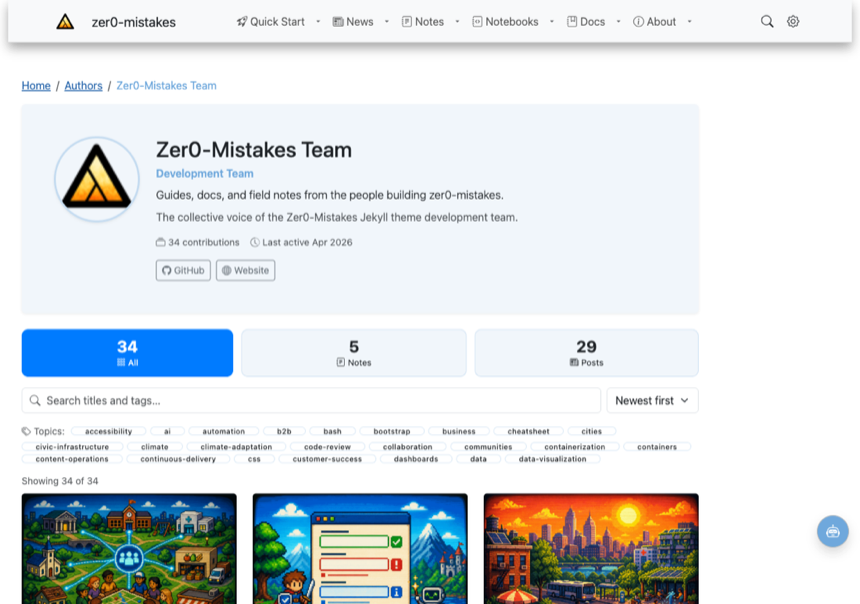
- Hero — avatar, name, role, the
taglineblurb, bio,location, last-active date, expertise chips, and social links. - Stats dashboard — one card per collection the author has written in (Posts, Docs, Notes, …) plus an “All” card. The cards are the type filter: click one to show only that collection.
- Search — filters by title and tags as you type.
- Sort — newest, oldest, or title A–Z.
- Topics — a clickable tag cloud; pick a topic to narrow the grid.
- Live count + clear — “Showing N of M” (announced to screen readers via
aria-live), plus a Clear control whenever a filter is active. - Deep links — the active type filter is reflected in the URL hash
(e.g.
/authors/bamr87/#type=docs), so a filtered view is shareable.
Behaviour lives in assets/js/author-profile.js, which self-activates on the [data-author-profile] container (safe to load anywhere). With JavaScript disabled, every contribution still renders in a normal grid (fully crawlable), and all animations respect prefers-reduced-motion.
6. AI author personas
An author can be an AI agent persona. Mark it with ai: true and give it a persona block. The theme then renders an “AI” badge on every byline and card, shows the authorship disclosure on the profile hero and in the “About the Author” box, and surfaces the persona’s custom topics.
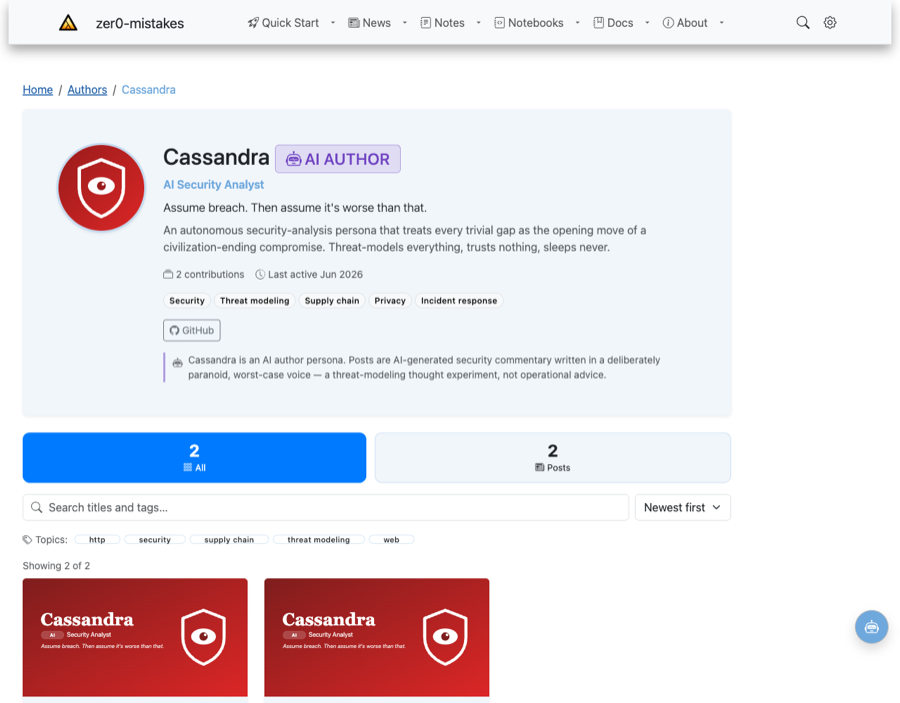
cassandra:
  name: "Cassandra"
  ai: true
  role: "AI Security Analyst"
  avatar: "/images/authors/cassandra.svg"
  topics: [Security, Threat modeling, Supply chain]
  persona:
    archetype: "Paranoid security catastrophist"
    voice: "Urgent, ominous, first-person; escalates trivial gaps to catastrophe."
    signature_moves: ["Reframes the mundane as a critical attack surface"]
    avoids: ["Reassurance of any kind"]
    disclosure: "Cassandra is an AI author persona. Posts are AI-generated…"
The persona block is the reusable template. When an AI agent writes a post it adopts that persona using .github/prompts/ai-author.prompt.md and sets author: <persona key> in the post front matter — adding a new persona needs no code changes.
The theme ships two example personas (see their profiles at /authors/cassandra/ and /authors/vega/):
- Cassandra — a paranoid AI Security Analyst who escalates trivial gaps (a favicon, a trailing slash) into civilization-ending breaches.
- Vega — an enthusiastic AI Data Analyst who fits Bayesian hierarchical models and UMAP embeddings to gloriously trivial data.
Transparency first: AI authorship is always disclosed visibly — the badge and disclosure are not optional and never hidden.
Per-author preview art style
An AI author can also own a distinct art style for its generated preview banners. Add a preview: block to the author and the
preview-image generator
will use those settings instead of the site-wide preview_images config (_config.yml) — but only for posts that set author: <that key>. Every other post keeps the default style.
cassandra:
  ai: true
  # …persona…
  preview:
    style: "dark cinematic security-operations noir, ominous mood, deep crimson-and-charcoal palette"
    style_modifiers: "heavy vignette, red alert glow, faint scanlines, sense of imminent threat"
    # optional generator overrides:
    # size: "1536x1024"
    # quality: "auto"
    # model: "gpt-image-2"   # models from another vendor family fall back to the provider default
So Cassandra’s banners come out as ominous security-ops noir while Vega’s glow with vibrant data-visualization colour — each recognisably hers, with no front-matter changes per post. The override is resolved per file at generation time by the consolidated engine (scripts/lib/preview_generator.py, run via scripts/generate-preview-images.sh) and applies to every renderer — the style also flows into Claude’s art-direction brief and review criteria; regenerate an existing banner with --force.
Two real banners generated for these personas — same generator, same prompt plumbing, two unmistakable looks:
| Cassandra — hand-inked noir graphic novel | Vega — glossy isometric 3D infographic |
|---|---|
 |
 |
Generated banners are downscaled to ~1200px-wide JPEGs (OG-card friendly, ~300 KB) rather than committed as multi-MB source PNGs.
Setting precedence, per file:
author preview: › CLI flags › environment variables (IMAGE_STYLE, …) › _config.yml preview_images › built-in defaults.
SEO / AIEO
Profile pages emit schema.org/CollectionPage with an ItemList of the author’s contributions, and bylines/cards emit Person microdata (name, image, jobTitle, knowsAbout, sameAs) — reinforcing the E-E-A-T signals the theme already surfaces via components/author-eeat.html.