Test Jupyter Notebook
This is a test notebook to demonstrate Jupyter notebook rendering in Jekyll with the Zer0-Mistakes theme.
Purpose
This notebook showcases:
- Markdown cells with rich formatting
- Code cells with Python execution
- Mathematical equations using LaTeX
- Data visualization with plots
- Tables and structured data
%pip install numpy pandas matplotlib
Collecting numpy
Downloading numpy-2.3.5-cp314-cp314-macosx_14_0_arm64.whl.metadata (62 kB)
Downloading numpy-2.3.5-cp314-cp314-macosx_14_0_arm64.whl.metadata (62 kB)
Collecting pandas
Collecting pandas
Downloading pandas-2.3.3-cp314-cp314-macosx_11_0_arm64.whl.metadata (91 kB)
Downloading pandas-2.3.3-cp314-cp314-macosx_11_0_arm64.whl.metadata (91 kB)
Collecting matplotlib
Collecting matplotlib
Downloading matplotlib-3.10.7-cp314-cp314-macosx_11_0_arm64.whl.metadata (11 kB)
Requirement already satisfied: python-dateutil>=2.8.2 in /Users/bamr87/github/zer0-mistakes/.venv/lib/python3.14/site-packages (from pandas) (2.9.0.post0)
Downloading matplotlib-3.10.7-cp314-cp314-macosx_11_0_arm64.whl.metadata (11 kB)
Requirement already satisfied: python-dateutil>=2.8.2 in /Users/bamr87/github/zer0-mistakes/.venv/lib/python3.14/site-packages (from pandas) (2.9.0.post0)
Collecting pytz>=2020.1 (from pandas)
Using cached pytz-2025.2-py2.py3-none-any.whl.metadata (22 kB)
Collecting pytz>=2020.1 (from pandas)
Using cached pytz-2025.2-py2.py3-none-any.whl.metadata (22 kB)
Collecting tzdata>=2022.7 (from pandas)
Using cached tzdata-2025.2-py2.py3-none-any.whl.metadata (1.4 kB)
Collecting tzdata>=2022.7 (from pandas)
Using cached tzdata-2025.2-py2.py3-none-any.whl.metadata (1.4 kB)
Collecting contourpy>=1.0.1 (from matplotlib)
Downloading contourpy-1.3.3-cp314-cp314-macosx_11_0_arm64.whl.metadata (5.5 kB)
Collecting cycler>=0.10 (from matplotlib)
Collecting contourpy>=1.0.1 (from matplotlib)
Downloading contourpy-1.3.3-cp314-cp314-macosx_11_0_arm64.whl.metadata (5.5 kB)
Collecting cycler>=0.10 (from matplotlib)
Downloading cycler-0.12.1-py3-none-any.whl.metadata (3.8 kB)
Downloading cycler-0.12.1-py3-none-any.whl.metadata (3.8 kB)
Collecting fonttools>=4.22.0 (from matplotlib)
Downloading fonttools-4.61.0-cp314-cp314-macosx_10_15_universal2.whl.metadata (113 kB)
Collecting fonttools>=4.22.0 (from matplotlib)
Downloading fonttools-4.61.0-cp314-cp314-macosx_10_15_universal2.whl.metadata (113 kB)
Collecting kiwisolver>=1.3.1 (from matplotlib)
Downloading kiwisolver-1.4.9-cp314-cp314-macosx_11_0_arm64.whl.metadata (6.3 kB)
Collecting kiwisolver>=1.3.1 (from matplotlib)
Downloading kiwisolver-1.4.9-cp314-cp314-macosx_11_0_arm64.whl.metadata (6.3 kB)
Requirement already satisfied: packaging>=20.0 in /Users/bamr87/github/zer0-mistakes/.venv/lib/python3.14/site-packages (from matplotlib) (25.0)
Requirement already satisfied: packaging>=20.0 in /Users/bamr87/github/zer0-mistakes/.venv/lib/python3.14/site-packages (from matplotlib) (25.0)
Collecting pillow>=8 (from matplotlib)
Using cached pillow-12.0.0-cp314-cp314-macosx_11_0_arm64.whl.metadata (8.8 kB)
Collecting pillow>=8 (from matplotlib)
Using cached pillow-12.0.0-cp314-cp314-macosx_11_0_arm64.whl.metadata (8.8 kB)
Collecting pyparsing>=3 (from matplotlib)
Downloading pyparsing-3.2.5-py3-none-any.whl.metadata (5.0 kB)
Collecting pyparsing>=3 (from matplotlib)
Downloading pyparsing-3.2.5-py3-none-any.whl.metadata (5.0 kB)
Requirement already satisfied: six>=1.5 in /Users/bamr87/github/zer0-mistakes/.venv/lib/python3.14/site-packages (from python-dateutil>=2.8.2->pandas) (1.17.0)
Downloading numpy-2.3.5-cp314-cp314-macosx_14_0_arm64.whl (5.1 MB)
[?25l [90m━━━━━━━━━━━━━━━━━━━━━━━━━━━━━━━━━━━━━━━━[0m [32m0.0/5.1 MB[0m [31m?[0m eta [36m-:--:--[0mRequirement already satisfied: six>=1.5 in /Users/bamr87/github/zer0-mistakes/.venv/lib/python3.14/site-packages (from python-dateutil>=2.8.2->pandas) (1.17.0)
Downloading numpy-2.3.5-cp314-cp314-macosx_14_0_arm64.whl (5.1 MB)
[2K [90m━━━━━━━━━━━━━━━━━━━━━━━━━━━━━━━━━━━━━━━━[0m [32m5.1/5.1 MB[0m [31m6.6 MB/s[0m [33m0:00:00[0m eta [36m0:00:01[0mm
[?25hDownloading pandas-2.3.3-cp314-cp314-macosx_11_0_arm64.whl (10.8 MB)
[2K [90m━━━━━━━━━━━━━━━━━━━━━━━━━━━━━━━━━━━━━━━━[0m [32m5.1/5.1 MB[0m [31m6.6 MB/s[0m [33m0:00:00[0m
[?25hDownloading pandas-2.3.3-cp314-cp314-macosx_11_0_arm64.whl (10.8 MB)
[2K [90m━━━━━━━━━━━━━━━━━━━━━━━━━━━━━━━━━━━━━━━━[0m [32m10.8/10.8 MB[0m [31m3.9 MB/s[0m [33m0:00:02[0mm0:00:01[0m0:01[0mm
[2K [90m━━━━━━━━━━━━━━━━━━━━━━━━━━━━━━━━━━━━━━━━[0m [32m10.8/10.8 MB[0m [31m3.9 MB/s[0m [33m0:00:02[0mm0:00:01[0m
[?25hDownloading matplotlib-3.10.7-cp314-cp314-macosx_11_0_arm64.whl (8.1 MB)
[?25l [90m━━━━━━━━━━━━━━━━━━━━━━━━━━━━━━━━━━━━━━━━[0m [32m0.0/8.1 MB[0m [31m?[0m eta [36m-:--:--[0mDownloading matplotlib-3.10.7-cp314-cp314-macosx_11_0_arm64.whl (8.1 MB)
[2K [90m━━━━━━━━━━━━━━━━━━━━━━━━━━━━━━━━━━━━━━━━[0m [32m8.1/8.1 MB[0m [31m7.0 MB/s[0m [33m0:00:01[0m eta [36m0:00:01[0m
[?25hDownloading contourpy-1.3.3-cp314-cp314-macosx_11_0_arm64.whl (273 kB)
[2K [90m━━━━━━━━━━━━━━━━━━━━━━━━━━━━━━━━━━━━━━━━[0m [32m8.1/8.1 MB[0m [31m7.0 MB/s[0m [33m0:00:01[0m
[?25hDownloading contourpy-1.3.3-cp314-cp314-macosx_11_0_arm64.whl (273 kB)
Downloading cycler-0.12.1-py3-none-any.whl (8.3 kB)
Downloading cycler-0.12.1-py3-none-any.whl (8.3 kB)
Downloading fonttools-4.61.0-cp314-cp314-macosx_10_15_universal2.whl (2.8 MB)
[?25l [90m━━━━━━━━━━━━━━━━━━━━━━━━━━━━━━━━━━━━━━━━[0m [32m0.0/2.8 MB[0m [31m?[0m eta [36m-:--:--[0mDownloading fonttools-4.61.0-cp314-cp314-macosx_10_15_universal2.whl (2.8 MB)
[2K [90m━━━━━━━━━━━━━━━━━━━━━━━━━━━━━━━━━━━━━━━━[0m [32m2.8/2.8 MB[0m [31m4.3 MB/s[0m [33m0:00:00[0m eta [36m0:00:01[0m
[2K [90m━━━━━━━━━━━━━━━━━━━━━━━━━━━━━━━━━━━━━━━━[0m [32m2.8/2.8 MB[0m [31m4.3 MB/s[0m [33m0:00:00[0m eta [36m0:00:01[0m
[?25hDownloading kiwisolver-1.4.9-cp314-cp314-macosx_11_0_arm64.whl (64 kB)
Using cached pillow-12.0.0-cp314-cp314-macosx_11_0_arm64.whl (4.7 MB)
Downloading pyparsing-3.2.5-py3-none-any.whl (113 kB)
Downloading kiwisolver-1.4.9-cp314-cp314-macosx_11_0_arm64.whl (64 kB)
Using cached pillow-12.0.0-cp314-cp314-macosx_11_0_arm64.whl (4.7 MB)
Downloading pyparsing-3.2.5-py3-none-any.whl (113 kB)
Using cached pytz-2025.2-py2.py3-none-any.whl (509 kB)
Using cached tzdata-2025.2-py2.py3-none-any.whl (347 kB)
Using cached pytz-2025.2-py2.py3-none-any.whl (509 kB)
Using cached tzdata-2025.2-py2.py3-none-any.whl (347 kB)
Installing collected packages: pytz, tzdata, pyparsing, pillow, numpy, kiwisolver, fonttools, cycler, pandas, contourpy, matplotlib
Installing collected packages: pytz, tzdata, pyparsing, pillow, numpy, kiwisolver, fonttools, cycler, pandas, contourpy, matplotlib
[2K [90m━━━━━━━━━━━━━━━━━━━━━━━━━━━━━━━━━━━━━━━━[0m [32m11/11[0m [matplotlib]1[0m [matplotlib]
[1A[2KSuccessfully installed contourpy-1.3.3 cycler-0.12.1 fonttools-4.61.0 kiwisolver-1.4.9 matplotlib-3.10.7 numpy-2.3.5 pandas-2.3.3 pillow-12.0.0 pyparsing-3.2.5 pytz-2025.2 tzdata-2025.2
[2K [90m━━━━━━━━━━━━━━━━━━━━━━━━━━━━━━━━━━━━━━━━[0m [32m11/11[0m [matplotlib]1[0m [matplotlib]
[1A[2KSuccessfully installed contourpy-1.3.3 cycler-0.12.1 fonttools-4.61.0 kiwisolver-1.4.9 matplotlib-3.10.7 numpy-2.3.5 pandas-2.3.3 pillow-12.0.0 pyparsing-3.2.5 pytz-2025.2 tzdata-2025.2
Note: you may need to restart the kernel to use updated packages.
Note: you may need to restart the kernel to use updated packages.
# Import required libraries
import numpy as np
import matplotlib.pyplot as plt
import pandas as pd

print("Libraries imported successfully!")
print(f"NumPy version: {np.__version__}")
print(f"Pandas version: {pd.__version__}")
Libraries imported successfully!
NumPy version: 2.3.5
Pandas version: 2.3.3
Mathematical Equations
Jupyter notebooks support LaTeX equations via MathJax:
Inline equation: $E = mc^2$
Display equation:
\[\int_{-\infty}^{\infty} e^{-x^2} dx = \sqrt{\pi}\]More complex equation:
\[f(x) = \frac{1}{\sigma\sqrt{2\pi}} e^{-\frac{1}{2}\left(\frac{x-\mu}{\sigma}\right)^2}\]# Generate sample data
x = np.linspace(0, 10, 100)
y1 = np.sin(x)
y2 = np.cos(x)
# Create a simple plot
plt.figure(figsize=(10, 6))
plt.plot(x, y1, label='sin(x)', linewidth=2)
plt.plot(x, y2, label='cos(x)', linewidth=2)
plt.xlabel('x')
plt.ylabel('y')
plt.title('Trigonometric Functions')
plt.legend()
plt.grid(True, alpha=0.3)
plt.show()
print("Plot generated successfully!")
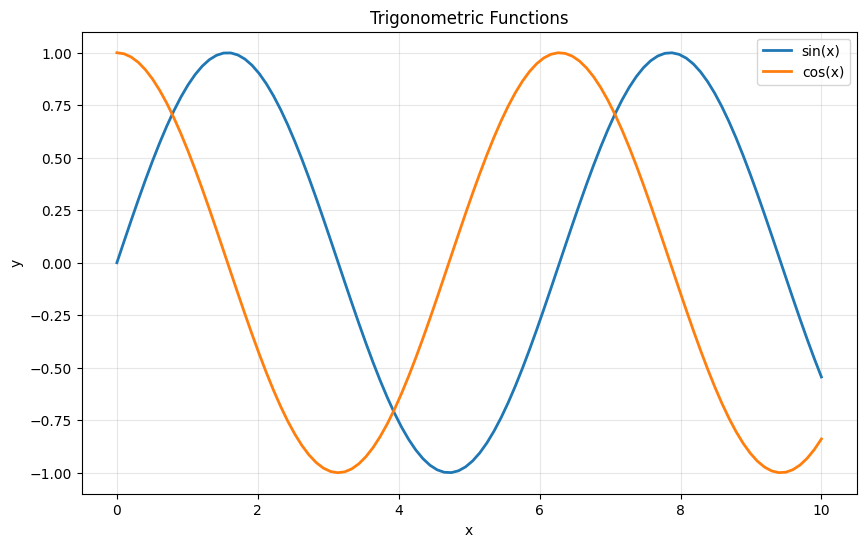
Plot generated successfully!
Data Tables
Pandas DataFrames render as nice HTML tables:
# Create a sample DataFrame
data = {
    'Name': ['Alice', 'Bob', 'Charlie', 'David', 'Eve'],
    'Age': [25, 30, 35, 28, 32],
    'City': ['New York', 'San Francisco', 'Chicago', 'Boston', 'Seattle'],
    'Score': [95, 87, 92, 88, 91]
}

df = pd.DataFrame(data)
print(f"DataFrame shape: {df.shape}")
df
DataFrame shape: (5, 4)
| Name | Age | City | Score | |
|---|---|---|---|---|
| 0 | Alice | 25 | New York | 95 |
| 1 | Bob | 30 | San Francisco | 87 |
| 2 | Charlie | 35 | Chicago | 92 |
| 3 | David | 28 | Boston | 88 |
| 4 | Eve | 32 | Seattle | 91 |
Code Formatting
Jupyter notebooks display code with proper syntax highlighting:
Lists and Loops
# Fibonacci sequence generator
def fibonacci(n):
    """Generate Fibonacci sequence up to n terms."""
    fib = [0, 1]
    while len(fib) < n:
        fib.append(fib[-1] + fib[-2])
    return fib

# Generate and display first 10 Fibonacci numbers
fib_sequence = fibonacci(10)
print("First 10 Fibonacci numbers:")
for i, num in enumerate(fib_sequence, 1):
    print(f"F({i}) = {num}")
First 10 Fibonacci numbers:
F(1) = 0
F(2) = 1
F(3) = 1
F(4) = 2
F(5) = 3
F(6) = 5
F(7) = 8
F(8) = 13
F(9) = 21
F(10) = 34
Conclusion
This test notebook demonstrates the key features of Jupyter notebook rendering in Jekyll:
✅ Markdown formatting with headers, lists, and emphasis
✅ LaTeX equations for mathematical notation
✅ Code cells with syntax highlighting
✅ Data visualization with matplotlib plots
✅ Data tables with pandas DataFrames
✅ Rich output from code execution
The notebook conversion system:
- Converts
.ipynbfiles to Jekyll-compatible Markdown - Extracts images to
assets/images/notebooks/ - Adds proper front matter with metadata
- Maintains code cell formatting and outputs
- Preserves mathematical equations for MathJax rendering
Next Steps:
- Add more complex visualizations
- Include interactive widgets (note: will be static in Jekyll)
- Test with larger datasets
- Verify GitHub Pages compatibility